# HOWTO Install a K3s cluster for the ARNEIS project
## Introduction
This document explains how to install a [K3s](https://k3s.io/) cluster to be used for the ARNEIS project.
K3s (or "Lightweight Kubernetes") is a simplified installation of the [Kubernetes](https://kubernetes.io/) distribution built for IoT and Edge computing.
K3s is an Open Source project started and maintained by [Rancher.com](https://rancher.com/).
### Architecture
The following diagram shows a possible deployment of the K3s architecture:

(Image credits: )
The main host will act as both a K3s Server (previously called "master" in Kubernetes literature) and Agent (worker) Node. This is the smallest possible deployment of a K3s cluster. Additionally, other machines - either physical or virtual - may be added to the topology to act as Agent Nodes, thus adding redundancy and increasing the computation and storage capacity of the cluster.
### References
* [Rancher docs](https://rancher.com/docs/)
* [K3S Installation](https://rancher.com/docs/k3s/latest/en/installation/) - from rancher.com/docs
## Prerequisites
### Host acting as K3s Server
* Administrative login to a host (either physical or virtual) with requirements detailed at - more specifically:
- CPU: min 2 cores
- RAM: min 16 GiB
- Disk: min 8 GiB SSD
- OS: Ubuntu server 20.04 LTS
- Fast internet connection (for updating OS and installing software)
- Firewall configured to accept incoming ports:
- 22/tcp (SSH)
- 80/tcp (HTTP)
- 443/tcp (HTTPS)
- 6443/tcp,udp (Kubernetes API server)
- Tested on `arneis-vm01` (Virtual Machine on Azure Cloud - See [documentation](howto-create-vm-on-azure.md))
### Host(s) acting as Agent Node(s)
* Administrative login to a host (either physical or virtual) with the requirements detailed at
- Tested on `arneis-vm02` (Virtual Machine on Azure Cloud - See [documentation](howto-create-vm-on-azure.md))
- Also tested on `rpi4gm35` (Raspberry Pi 4B - See [documentation](howto-prepare-rpi4b-for-arneis.md))
## Deploy the first node of the cluster
A minimal K3s cluster is made of one host (either physical or virtual) which acts both as Server and Agent Node.
In our example, we will deploy the main node of the K3s cluster on `root@arneis-vm01` (Ubuntu 20.04.4 LTS):
```text
root@arneis-vm01:~# cat /etc/os-release
NAME="Ubuntu"
VERSION="20.04.4 LTS (Focal Fossa)"
ID=ubuntu
ID_LIKE=debian
PRETTY_NAME="Ubuntu 20.04.4 LTS"
VERSION_ID="20.04"
HOME_URL="https://www.ubuntu.com/"
SUPPORT_URL="https://help.ubuntu.com/"
BUG_REPORT_URL="https://bugs.launchpad.net/ubuntu/"
PRIVACY_POLICY_URL="https://www.ubuntu.com/legal/terms-and-policies/privacy-policy"
VERSION_CODENAME=focal
UBUNTU_CODENAME=focal
root@arneis-vm01:~#
```
### Install K3s on the main node
Logged in as `root@arneis-vm01`, install k3s
```bash
curl -sfL https://get.k3s.io | \
INSTALL_K3S_EXEC="--node-external-ip $(curl ifconfig.co)" sh -
```
Result:
```text
root@arneis-vm01:~# curl -sfL https://get.k3s.io | \
> INSTALL_K3S_EXEC="--node-external-ip $(curl ifconfig.co)" sh -
% Total % Received % Xferd Average Speed Time Time Time Current
Dload Upload Total Spent Left Speed
100 14 100 14 0 0 145 0 --:--:-- --:--:-- --:--:-- 145
[INFO] Finding release for channel stable
[INFO] Using v1.22.7+k3s1 as release
[INFO] Downloading hash https://github.com/k3s-io/k3s/releases/download/v1.22.7+k3s1/sha256sum-amd64.txt
[INFO] Skipping binary downloaded, installed k3s matches hash
[INFO] Skipping installation of SELinux RPM
[INFO] Skipping /usr/local/bin/kubectl symlink to k3s, already exists
[INFO] Skipping /usr/local/bin/crictl symlink to k3s, already exists
[INFO] Skipping /usr/local/bin/ctr symlink to k3s, already exists
[INFO] Creating killall script /usr/local/bin/k3s-killall.sh
[INFO] Creating uninstall script /usr/local/bin/k3s-uninstall.sh
[INFO] env: Creating environment file /etc/systemd/system/k3s.service.env
[INFO] systemd: Creating service file /etc/systemd/system/k3s.service
[INFO] systemd: Enabling k3s unit
Created symlink /etc/systemd/system/multi-user.target.wants/k3s.service → /etc/systemd/system/k3s.service.
[INFO] systemd: Starting k3s
root@arneis-vm01:~#
```
**NOTE**: The `--node-external-ip addr` option is required for some hosts such as Azure VMs.
This option will make sure that the K3s API Server will advertise its public IP address.
The page at provides more detail about the `--node-external-ip value` option.
### Verify the installation of the main node
The installation of the cluster might take a few minutes.
#### Check the nodes in the cluster
Logged in as `root@`, type the following command to list all the nodes which have joined the cluster:
```bash
kubectl get nodes
```
Since the cluster has just been created, only one node should be displayed as shown below:
```text
root@arneis-vm01:~# kubectl get nodes
NAME STATUS ROLES AGE VERSION
arneis-vm01 Ready control-plane,master 48s v1.22.7+k3s1
root@arneis-vm01:~#
```
If the result is the same, proceed with the next check.
#### Check the K3s core services
Logged in as `root@`, type the following command to verify that all the K3S core services are up and running:
```bash
kubectl get all --all-namespaces
```
Result
```text
root@arneis-vm01:~# kubectl get all --all-namespaces
NAMESPACE NAME READY STATUS RESTARTS AGE
kube-system pod/local-path-provisioner-84bb864455-zlqqm 1/1 Running 0 4h29m
kube-system pod/helm-install-traefik-crd--1-kldlb 0/1 Completed 0 4h29m
kube-system pod/helm-install-traefik--1-ndkrh 0/1 Completed 2 4h29m
kube-system pod/svclb-traefik-b9tvv 2/2 Running 0 4h29m
default pod/busybox-sleep 1/1 Running 0 4h22m
kube-system pod/metrics-server-ff9dbcb6c-2wh9z 1/1 Running 0 4h29m
kube-system pod/coredns-96cc4f57d-dsv74 1/1 Running 0 4h29m
kube-system pod/traefik-56c4b88c4b-hxn24 1/1 Running 0 4h29m
kube-system pod/svclb-traefik-zf9lj 2/2 Running 0 61s
NAMESPACE NAME TYPE CLUSTER-IP EXTERNAL-IP PORT(S) AGE
default service/kubernetes ClusterIP 10.43.0.1 443/TCP 4h30m
kube-system service/kube-dns ClusterIP 10.43.0.10 53/UDP,53/TCP,9153/TCP 4h30m
kube-system service/metrics-server ClusterIP 10.43.137.232 443/TCP 4h30m
kube-system service/traefik LoadBalancer 10.43.115.89 20.124.132.35 80:30032/TCP,443:32150/TCP 4h29m
NAMESPACE NAME DESIRED CURRENT READY UP-TO-DATE AVAILABLE NODE SELECTOR AGE
kube-system daemonset.apps/svclb-traefik 2 2 2 2 2 4h29m
NAMESPACE NAME READY UP-TO-DATE AVAILABLE AGE
kube-system deployment.apps/local-path-provisioner 1/1 1 1 4h30m
kube-system deployment.apps/coredns 1/1 1 1 4h30m
kube-system deployment.apps/metrics-server 1/1 1 1 4h30m
kube-system deployment.apps/traefik 1/1 1 1 4h29m
NAMESPACE NAME DESIRED CURRENT READY AGE
kube-system replicaset.apps/local-path-provisioner-84bb864455 1 1 1 4h29m
kube-system replicaset.apps/coredns-96cc4f57d 1 1 1 4h29m
kube-system replicaset.apps/metrics-server-ff9dbcb6c 1 1 1 4h29m
kube-system replicaset.apps/traefik-56c4b88c4b 1 1 1 4h29m
NAMESPACE NAME COMPLETIONS DURATION AGE
kube-system job.batch/helm-install-traefik-crd 1/1 24s 4h30m
kube-system job.batch/helm-install-traefik 1/1 41s 4h30m
root@arneis-vm01:~#
```
Make sure that all the pods in `NAMESPACE=kube-system` have `STATUS=Running`, with the exception of the pods whose name begins with `helm-install-`.
Those are one-time pods used for installing other Kubernetes resources; in this case, make sure they have `STATUS=Completed`.
Please also verify that LoadBalancer `service/traefik` has a publicly accessible `EXTERNAL-IP` address, and not a private (non-routable) IP Address.
Refer to the explanation about `--node-external-ip addr` option earlier in this document.
#### Check the TLS certificates installed on the K3s server
Logged in as `root@`, type the following command:
```bash
ls -la /var/lib/rancher/k3s/server/tls/
```
Result:
```text
root@arneis-vm01:~# ls -la /var/lib/rancher/k3s/server/tls/
total 128
drwx------ 4 root root 4096 Mar 9 10:49 .
drwx------ 7 root root 4096 Mar 9 15:16 ..
-rw-r--r-- 1 root root 1173 Mar 9 10:49 client-admin.crt
-rw------- 1 root root 227 Mar 9 10:49 client-admin.key
-rw-r--r-- 1 root root 1178 Mar 9 10:49 client-auth-proxy.crt
-rw------- 1 root root 227 Mar 9 10:49 client-auth-proxy.key
-rw-r--r-- 1 root root 570 Mar 9 10:49 client-ca.crt
-rw------- 1 root root 227 Mar 9 10:49 client-ca.key
-rw-r--r-- 1 root root 1165 Mar 9 10:49 client-controller.crt
-rw------- 1 root root 227 Mar 9 10:49 client-controller.key
-rw-r--r-- 1 root root 1161 Mar 9 10:49 client-k3s-cloud-controller.crt
-rw------- 1 root root 227 Mar 9 10:49 client-k3s-cloud-controller.key
-rw-r--r-- 1 root root 1153 Mar 9 10:49 client-k3s-controller.crt
-rw------- 1 root root 227 Mar 9 10:49 client-k3s-controller.key
-rw-r--r-- 1 root root 1144 Mar 9 10:49 client-kube-apiserver.crt
-rw------- 1 root root 227 Mar 9 10:49 client-kube-apiserver.key
-rw-r--r-- 1 root root 1144 Mar 9 10:49 client-kube-proxy.crt
-rw------- 1 root root 227 Mar 9 10:49 client-kube-proxy.key
-rw------- 1 root root 227 Mar 9 10:49 client-kubelet.key
-rw-r--r-- 1 root root 1153 Mar 9 10:49 client-scheduler.crt
-rw------- 1 root root 227 Mar 9 10:49 client-scheduler.key
-rw-r--r-- 1 root root 3213 Mar 9 13:57 dynamic-cert.json
drwxr-xr-x 2 root root 4096 Mar 9 10:49 etcd
-rw-r--r-- 1 root root 591 Mar 9 10:49 request-header-ca.crt
-rw------- 1 root root 227 Mar 9 10:49 request-header-ca.key
-rw-r--r-- 1 root root 570 Mar 9 10:49 server-ca.crt
-rw------- 1 root root 227 Mar 9 10:49 server-ca.key
-rw------- 1 root root 1679 Mar 9 10:49 service.key
-rw-r--r-- 1 root root 1356 Mar 9 15:16 serving-kube-apiserver.crt
-rw------- 1 root root 227 Mar 9 15:16 serving-kube-apiserver.key
-rw------- 1 root root 227 Mar 9 10:49 serving-kubelet.key
drwx------ 2 root root 4096 Mar 9 10:49 temporary-certs
root@arneis-vm01:~#
```
#### Run a sample Pod on the cluster
The commands shown in this section have the purpose to verify that the cluster is ready to execute a simple workload.
Logged in as `root@arneis-vm01`, create a file `test.yaml` with the following contents:
```yaml
apiVersion: v1
kind: Pod
metadata:
name: busybox-sleep
spec:
containers:
- name: busybox
image: busybox
args:
- sleep
- "1000000"
```
then run `kubectl apply -f test.yaml`:
```bash
kubectl apply -f test.yaml
```
Result:
```text
root@arneis-vm01:~# kubectl apply -f test.yaml
pod/busybox-sleep created
root@arneis-vm01:~#
```
Now check that the new Pod is up and running
```bash
kubectl get pods
```
Result:
```text
root@arneis-vm01:~# kubectl get pods
NAME READY STATUS RESTARTS AGE
busybox-sleep 1/1 Running 0 59s
root@arneis-vm01:~#
```
## Add a new agent node to the cluster
After we have verified that K3s server is up and running we are ready to add new Agent Node(s) to the cluster.
In our example, we will add host `arneis-vm02` (Ubuntu 20.04.4 LTS) as a K3s Agent Node:
```text
root@arneis-vm02:~# cat /etc/os-release
NAME="Ubuntu"
VERSION="20.04.4 LTS (Focal Fossa)"
ID=ubuntu
ID_LIKE=debian
PRETTY_NAME="Ubuntu 20.04.4 LTS"
VERSION_ID="20.04"
HOME_URL="https://www.ubuntu.com/"
SUPPORT_URL="https://help.ubuntu.com/"
BUG_REPORT_URL="https://bugs.launchpad.net/ubuntu/"
PRIVACY_POLICY_URL="https://www.ubuntu.com/legal/terms-and-policies/privacy-policy"
VERSION_CODENAME=focal
UBUNTU_CODENAME=focal
root@arneis-vm02:~#
```
### Verify accessibility of the K3s API server
Logged in as `root@` try to access URL `https://:6443/` to make sure that the network connectivity to the cluster API server can properly be established and there are no blocking firewalls in between.
You can verify the connectivity using several methods, such as:
1. Using curl
2. Using a web browser
#### Example 1: Using curl
Verify HTTPS connectivity to the K3s API server (by default, on port `443`) with the following command:
```bash
curl https://:/
```
Example:
```text
root@arneis-vm02:~# curl https://arneis-vm01.gmacario.it:6443/
curl: (60) SSL certificate problem: unable to get local issuer certificate
More details here: https://curl.haxx.se/docs/sslcerts.html
curl failed to verify the legitimacy of the server and therefore could not
establish a secure connection to it. To learn more about this situation and
how to fix it, please visit the web page mentioned above.
root@arneis-vm02:~#
```
**NOTE**: The error is expected since the K3s API server uses custom certificates available under `/var/lib/rancher/k3s/server/tls` which are used to establish trust between clients (agents) and server.
As a workaround, try adding the `-k` option to `curl` (you could also add the `-v` option to increase verbosity to `curl`):
```text
root@arneis-vm02:~# curl -v -k https://arneis-vm01.gmacario.it:6443/
* Trying 20.124.132.35:6443...
* TCP_NODELAY set
* Connected to arneis-vm01.gmacario.it (20.124.132.35) port 6443 (#0)
* ALPN, offering h2
* ALPN, offering http/1.1
* successfully set certificate verify locations:
* CAfile: /etc/ssl/certs/ca-certificates.crt
CApath: /etc/ssl/certs
* TLSv1.3 (OUT), TLS handshake, Client hello (1):
* TLSv1.3 (IN), TLS handshake, Server hello (2):
* TLSv1.3 (IN), TLS handshake, Encrypted Extensions (8):
* TLSv1.3 (IN), TLS handshake, Request CERT (13):
* TLSv1.3 (IN), TLS handshake, Certificate (11):
* TLSv1.3 (IN), TLS handshake, CERT verify (15):
* TLSv1.3 (IN), TLS handshake, Finished (20):
* TLSv1.3 (OUT), TLS change cipher, Change cipher spec (1):
* TLSv1.3 (OUT), TLS handshake, Certificate (11):
* TLSv1.3 (OUT), TLS handshake, Finished (20):
* SSL connection using TLSv1.3 / TLS_AES_256_GCM_SHA384
* ALPN, server did not agree to a protocol
* Server certificate:
* subject: O=k3s; CN=k3s
* start date: Mar 9 10:49:18 2022 GMT
* expire date: Mar 9 13:57:56 2023 GMT
* issuer: CN=k3s-server-ca@1646822958
* SSL certificate verify result: unable to get local issuer certificate (20), continuing anyway.
> GET / HTTP/1.1
> Host: arneis-vm01.gmacario.it:6443
> User-Agent: curl/7.68.0
> Accept: */*
>
* TLSv1.3 (IN), TLS handshake, Newsession Ticket (4):
* Mark bundle as not supporting multiuse
< HTTP/1.1 401 Unauthorized
< Audit-Id: 49df68d0-efe8-4e1b-91ca-65070259bc52
< Cache-Control: no-cache, private
< Content-Type: application/json
< Date: Wed, 09 Mar 2022 15:48:42 GMT
< Content-Length: 165
<
{
"kind": "Status",
"apiVersion": "v1",
"metadata": {
},
"status": "Failure",
"message": "Unauthorized",
"reason": "Unauthorized",
"code": 401
* Connection #0 to host arneis-vm01.gmacario.it left intact
}root@arneis-vm02:~#
```
Again, HTTP error code 401 is expected since the K3s API server requires authentication.
#### Example 2: Using a web browser
If you access the K3S API URL from a browser, the following error (on Firefox, you should have a similar error message on other browsers) will let you know that the K3S Server has a self-signed TLS certificate:
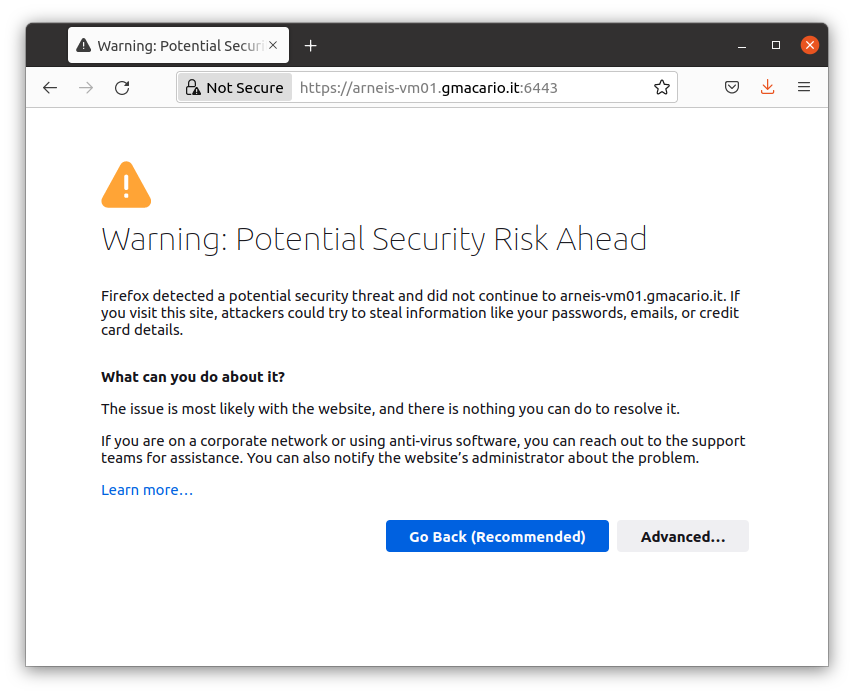
If so, click "Advanced..."

then click "Accept the Risk and Continue".
Once you passed the self-signed certificate warning, you should receive a 401 (Unauthorized) error, but this is correct since we did not provide the node-token - see below.

### Obtain the cluster node-token
The node-token is saved in a file under the folder `/var/lib/rancher/k3s/server` of the k3s server.
Logged in as `root@arneis-vm01`, display the k3s node-token with the following command:
```bash
cat /var/lib/rancher/k3s/server/node-token
```
Result (for security reasons the node-token has partially been anonymized)
```text
root@arneis-vm01:~# cat /var/lib/rancher/k3s/server/node-token
K1015exxxxxxxxxxxxxxxxxxxxxxxxxxxxxxxxxxxxxxxxxxxxxxxxxf06408::server:f22587xxxxxxxxxxxxxxxxxxxxx8672c3
root@arneis-vm01:~#
```
### Attach the Agent Node
Logged in as `root@` (in our example, `root@arneis-vm02`) type the following commands to install the required software on the node and connect it to the k3s Server
Make sure you replace the placeholders
* `` --> `arneis-vm01.gmacario.it`
* `` --> (result of the command in the previous section)
```bash
export K3S_URL=https://:6443
export K3S_TOKEN=
curl -sfL https://get.k3s.io | sh -
```
Result:
```text
root@arneis-vm02:~# export K3S_URL=https://arneis-vm01.gmacario.it:6443
root@arneis-vm02:~# export K3S_TOKEN=K1015exxxxxxxxxxxxxxxxxxxxxxxxxxxxxxxxxxxxxxxxxxxxxxxxxxxxxxxf06408::server:f22587xxxxxxxxxxxxxxxxxxxx8672c3
root@arneis-vm02:~# curl -sfL https://get.k3s.io | sh -
[INFO] Finding release for channel stable
[INFO] Using v1.22.7+k3s1 as release
[INFO] Downloading hash https://github.com/k3s-io/k3s/releases/download/v1.22.7+k3s1/sha256sum-amd64.txt
[INFO] Downloading binary https://github.com/k3s-io/k3s/releases/download/v1.22.7+k3s1/k3s
[INFO] Verifying binary download
[INFO] Installing k3s to /usr/local/bin/k3s
[INFO] Skipping installation of SELinux RPM
[INFO] Creating /usr/local/bin/kubectl symlink to k3s
[INFO] Creating /usr/local/bin/crictl symlink to k3s
[INFO] Creating /usr/local/bin/ctr symlink to k3s
[INFO] Creating killall script /usr/local/bin/k3s-killall.sh
[INFO] Creating uninstall script /usr/local/bin/k3s-agent-uninstall.sh
[INFO] env: Creating environment file /etc/systemd/system/k3s-agent.service.env
[INFO] systemd: Creating service file /etc/systemd/system/k3s-agent.service
[INFO] systemd: Enabling k3s-agent unit
Created symlink /etc/systemd/system/multi-user.target.wants/k3s-agent.service → /etc/systemd/system/k3s-agent.service.
[INFO] systemd: Starting k3s-agent
root@arneis-vm02:~#
```
### Check that the Agent Node has joined the cluster
Logged in as `root@`, type the following command to list all the nodes of the cluster:
```bash
kubectl get nodes
```
```text
root@arneis-vm01:~# kubectl get nodes
NAME STATUS ROLES AGE VERSION
arneis-vm02 Ready 34m v1.22.7+k3s1
arneis-vm01 Ready control-plane,master 5h3m v1.22.7+k3s1
root@arneis-vm01:~#
```
Verify that the new Agent Node is listed. If not, refer to the section "Troubleshooting the agent install script" below.
## Troubleshooting installation issue
This section lists a few methods to troubleshoot possible installation problems.
### Run the agent install script in verbose mode
Let's retry adding the `-x` option to `sh`:
```text
root@arneis-vm02:~# curl -sfL https://get.k3s.io | sh -x -
+ set -e
+ set -o noglob
+ GITHUB_URL=https://github.com/k3s-io/k3s/releases
+ STORAGE_URL=https://storage.googleapis.com/k3s-ci-builds
+ DOWNLOADER=
+ escape
+ sed -e s/\([][!#$%&()*;<=>?\_`{|}]\)/\\\1/g;
+ printf %s
+ quote
+ eval set --
+ set --
+ verify_system
+ [ -x /sbin/openrc-run ]
+ [ -x /bin/systemctl ]
+ HAS_SYSTEMD=true
+ return
+ setup_env
+ [ -z https://arneis-vm01.gmacario.it:6443 ]
+ [ -z K1015exxxxxxxxxxxxxxxxxxxxxxxxxxxxxxxxxxxxxxxxxxxxxxxxxxxxxxxf06408::server:f22587xxxxxxxxxxxxxxxxxxxx8672c3 ]
+ CMD_K3S=agent
+ verify_k3s_url
+ quote_indent
+ printf \\\n
+ CMD_K3S_EXEC=agent \
+ [ -n ]
+ [ agent = server ]
+ SYSTEM_NAME=k3s-agent
+ printf %s k3s-agent+
sed -e s/[][!#$%&()*;<=>?\_`{|}/[:space:]]/^/g;
+ valid_chars=k3s-agent
+ [ k3s-agent != k3s-agent ]
+ SUDO=sudo
+ id -u
+ [ 0 -eq 0 ]
+ SUDO=
+ [ -n ]
+ [ agent = server ]
+ SYSTEMD_TYPE=exec
+ [ -n ]
+ BIN_DIR=/usr/local/bin
+ sh -c touch /usr/local/bin/k3s-ro-test && rm -rf /usr/local/bin/k3s-ro-test
+ [ -n ]
+ SYSTEMD_DIR=/etc/systemd/system
+ SERVICE_K3S=k3s-agent.service
+ UNINSTALL_K3S_SH=/usr/local/bin/k3s-agent-uninstall.sh
+ KILLALL_K3S_SH=/usr/local/bin/k3s-killall.sh
+ [ true = true ]
+ FILE_K3S_SERVICE=/etc/systemd/system/k3s-agent.service
+ FILE_K3S_ENV=/etc/systemd/system/k3s-agent.service.env
+ get_installed_hashes
+ sha256sum /usr/local/bin/k3s /etc/systemd/system/k3s-agent.service /etc/systemd/system/k3s-agent.service.env
+ PRE_INSTALL_HASHES=da1a566c6b3d470102ce431afdb921275ebe663659219562ac4d9854e5bbdf38 /usr/local/bin/k3s
592ab27950afde56cde608c071201c498c70d1f031a18d41f4c40d48ffb91ccf /etc/systemd/system/k3s-agent.service
4ed99b900d46582af831a1858036cf2baf1205db18d6ac5391d35a75db4db0d8 /etc/systemd/system/k3s-agent.service.env
+ [ = true ]
+ INSTALL_K3S_CHANNEL_URL=https://update.k3s.io/v1-release/channels
+ INSTALL_K3S_CHANNEL=stable
+ download_and_verify
+ can_skip_download
+ [ != true ]
+ return 1
+ setup_verify_arch
+ [ -z ]
+ uname -m
+ ARCH=x86_64
+ ARCH=amd64
+ SUFFIX=
+ verify_downloader curl
+ command -v curl
+ [ -x /usr/bin/curl ]
+ DOWNLOADER=curl
+ return 0
+ setup_tmp
+ mktemp -d -t k3s-install.XXXXXXXXXX
+ TMP_DIR=/tmp/k3s-install.pGUb5wqYIH
+ TMP_HASH=/tmp/k3s-install.pGUb5wqYIH/k3s.hash
+ TMP_BIN=/tmp/k3s-install.pGUb5wqYIH/k3s.bin
+ trap cleanup INT EXIT
+ get_release_version
+ [ -n ]
+ [ -n ]
+ info Finding release for channel stable
+ echo [INFO] Finding release for channel stable
[INFO] Finding release for channel stable
+ version_url=https://update.k3s.io/v1-release/channels/stable
+ curl -w %{url_effective}+ sed -e s|.*/||
-L -s -S https://update.k3s.io/v1-release/channels/stable -o /dev/null
+ VERSION_K3S=v1.22.7+k3s1
+ info Using v1.22.7+k3s1 as release
+ echo [INFO] Using v1.22.7+k3s1 as release
[INFO] Using v1.22.7+k3s1 as release
+ download_hash
+ [ -n ]
+ HASH_URL=https://github.com/k3s-io/k3s/releases/download/v1.22.7+k3s1/sha256sum-amd64.txt
+ info Downloading hash https://github.com/k3s-io/k3s/releases/download/v1.22.7+k3s1/sha256sum-amd64.txt
+ echo [INFO] Downloading hash https://github.com/k3s-io/k3s/releases/download/v1.22.7+k3s1/sha256sum-amd64.txt
[INFO] Downloading hash https://github.com/k3s-io/k3s/releases/download/v1.22.7+k3s1/sha256sum-amd64.txt
+ download /tmp/k3s-install.pGUb5wqYIH/k3s.hash https://github.com/k3s-io/k3s/releases/download/v1.22.7+k3s1/sha256sum-amd64.txt
+ [ 2 -eq 2 ]
+ curl -o /tmp/k3s-install.pGUb5wqYIH/k3s.hash -sfL https://github.com/k3s-io/k3s/releases/download/v1.22.7+k3s1/sha256sum-amd64.txt
+ [ 0 -eq 0 ]
+ grep k3s$ /tmp/k3s-install.pGUb5wqYIH/k3s.hash
+ HASH_EXPECTED=da1a566c6b3d470102ce431afdb921275ebe663659219562ac4d9854e5bbdf38 k3s
+ HASH_EXPECTED=da1a566c6b3d470102ce431afdb921275ebe663659219562ac4d9854e5bbdf38
+ installed_hash_matches
+ [ -x /usr/local/bin/k3s ]
+ sha256sum /usr/local/bin/k3s
+ HASH_INSTALLED=da1a566c6b3d470102ce431afdb921275ebe663659219562ac4d9854e5bbdf38 /usr/local/bin/k3s
+ HASH_INSTALLED=da1a566c6b3d470102ce431afdb921275ebe663659219562ac4d9854e5bbdf38
+ [ da1a566c6b3d470102ce431afdb921275ebe663659219562ac4d9854e5bbdf38 = da1a566c6b3d470102ce431afdb921275ebe663659219562ac4d9854e5bbdf38 ]
+ return
+ info Skipping binary downloaded, installed k3s matches hash
+ echo [INFO] Skipping binary downloaded, installed k3s matches hash
[INFO] Skipping binary downloaded, installed k3s matches hash
+ return
+ setup_selinux
+ rpm_channel=stable
+ rpm_site=rpm.rancher.io
+ [ stable = testing ]
+ [ -r /etc/os-release ]
+ . /etc/os-release
+ NAME=Ubuntu
+ VERSION=20.04.4 LTS (Focal Fossa)
+ ID=ubuntu
+ ID_LIKE=debian
+ PRETTY_NAME=Ubuntu 20.04.4 LTS
+ VERSION_ID=20.04
+ HOME_URL=https://www.ubuntu.com/
+ SUPPORT_URL=https://help.ubuntu.com/
+ BUG_REPORT_URL=https://bugs.launchpad.net/ubuntu/
+ PRIVACY_POLICY_URL=https://www.ubuntu.com/legal/terms-and-policies/privacy-policy
+ VERSION_CODENAME=focal
+ UBUNTU_CODENAME=focal
+ [ debian = suse ]
+ [ 20 = 7 ]
+ rpm_target=el8
+ rpm_site_infix=centos/8
+ package_installer=yum
+ [ yum = yum ]
+ [ -x /usr/bin/dnf ]
+ policy_hint=please install:
yum install -y container-selinux
yum install -y https://rpm.rancher.io/k3s/stable/common/centos/8/noarch/k3s-selinux-0.4-1.el8.noarch.rpm
+ [ = true ]
+ can_skip_download
+ [ != true ]
+ return 1
+ [ ! -d /usr/share/selinux ]
+ info Skipping installation of SELinux RPM
+ echo [INFO] Skipping installation of SELinux RPM
[INFO] Skipping installation of SELinux RPM
+ policy_error=fatal
+ [ = true ]
+ [ debian = coreos ]
+ [ = coreos ]
+ chcon -u system_u -r object_r -t container_runtime_exec_t /usr/local/bin/k3s
+ grep ^\s*SELINUX=enforcing /etc/selinux/config
+ create_symlinks
+ [ = true ]
+ [ = skip ]
+ [ ! -e /usr/local/bin/kubectl ]
+ [ = force ]
+ info Skipping /usr/local/bin/kubectl symlink to k3s, already exists
+ echo [INFO] Skipping /usr/local/bin/kubectl symlink to k3s, already exists
[INFO] Skipping /usr/local/bin/kubectl symlink to k3s, already exists
+ [ ! -e /usr/local/bin/crictl ]
+ [ = force ]
+ info Skipping /usr/local/bin/crictl symlink to k3s, already exists
+ echo [INFO] Skipping /usr/local/bin/crictl symlink to k3s, already exists
[INFO] Skipping /usr/local/bin/crictl symlink to k3s, already exists
+ [ ! -e /usr/local/bin/ctr ]
+ [ = force ]
+ info Skipping /usr/local/bin/ctr symlink to k3s, already exists
+ echo [INFO] Skipping /usr/local/bin/ctr symlink to k3s, already exists
[INFO] Skipping /usr/local/bin/ctr symlink to k3s, already exists
+ create_killall
+ [ = true ]
+ info Creating killall script /usr/local/bin/k3s-killall.sh
+ echo [INFO] Creating killall script /usr/local/bin/k3s-killall.sh
[INFO] Creating killall script /usr/local/bin/k3s-killall.sh
+ tee /usr/local/bin/k3s-killall.sh
+ chmod 755 /usr/local/bin/k3s-killall.sh
+ chown root:root /usr/local/bin/k3s-killall.sh
+ create_uninstall
+ [ = true ]
+ info Creating uninstall script /usr/local/bin/k3s-agent-uninstall.sh
+ echo [INFO] Creating uninstall script /usr/local/bin/k3s-agent-uninstall.sh
[INFO] Creating uninstall script /usr/local/bin/k3s-agent-uninstall.sh
+ tee /usr/local/bin/k3s-agent-uninstall.sh
+ chmod 755 /usr/local/bin/k3s-agent-uninstall.sh
+ chown root:root /usr/local/bin/k3s-agent-uninstall.sh
+ systemd_disable
+ systemctl disable k3s-agent
+ rm -f /etc/systemd/system/k3s-agent.service
+ rm -f /etc/systemd/system/k3s-agent.service.env
+ create_env_file
+ info env: Creating environment file /etc/systemd/system/k3s-agent.service.env
+ echo [INFO] env: Creating environment file /etc/systemd/system/k3s-agent.service.env
[INFO] env: Creating environment file /etc/systemd/system/k3s-agent.service.env
+ touch /etc/systemd/system/k3s-agent.service.env
+ chmod 0600 /etc/systemd/system/k3s-agent.service.env
+ tee /etc/systemd/system/k3s-agent.service.env
+ grep -E ^(K3S|CONTAINERD)_
+ read x v
+ sh -c export
+ echo HOME='/root'
+ read x v
+ echo K3S_TOKEN='K1015exxxxxxxxxxxxxxxxxxxxxxxxxxxxxxxxxxxxxxxxxxxxxxxxxxxxxxxf06408::server:f22587xxxxxxxxxxxxxxxxxxxx8672c3'
+ read x v
+ echo K3S_URL='https://arneis-vm01.gmacario.it:6443'
+ read x v
+ echo LANG='C.UTF-8'
+ read x v
+ echo LESSCLOSE='/usr/bin/lesspipe %s %s'
+ read x v
+ echo LESSOPEN='| /usr/bin/lesspipe %s'
+ read x v
+ echo LOGNAME='root'
+ read x v
+ echo LS_COLORS='rs=0:di=01;34:ln=01;36:mh=00:pi=40;33:so=01;35:do=01;35:bd=40;33;01:cd=40;33;01:or=40;31;01:mi=00:su=37;41:sg=30;43:ca=30;41:tw=30;42:ow=34;42:st=37;44:ex=01;32:*.tar=01;31:*.tgz=01;31:*.arc=01;31:*.arj=01;31:*.taz=01;31:*.lha=01;31:*.lz4=01;31:*.lzh=01;31:*.lzma=01;31:*.tlz=01;31:*.txz=01;31:*.tzo=01;31:*.t7z=01;31:*.zip=01;31:*.z=01;31:*.dz=01;31:*.gz=01;31:*.lrz=01;31:*.lz=01;31:*.lzo=01;31:*.xz=01;31:*.zst=01;31:*.tzst=01;31:*.bz2=01;31:*.bz=01;31:*.tbz=01;31:*.tbz2=01;31:*.tz=01;31:*.deb=01;31:*.rpm=01;31:*.jar=01;31:*.war=01;31:*.ear=01;31:*.sar=01;31:*.rar=01;31:*.alz=01;31:*.ace=01;31:*.zoo=01;31:*.cpio=01;31:*.7z=01;31:*.rz=01;31:*.cab=01;31:*.wim=01;31:*.swm=01;31:*.dwm=01;31:*.esd=01;31:*.jpg=01;35:*.jpeg=01;35:*.mjpg=01;35:*.mjpeg=01;35:*.gif=01;35:*.bmp=01;35:*.pbm=01;35:*.pgm=01;35:*.ppm=01;35:*.tga=01;35:*.xbm=01;35:*.xpm=01;35:*.tif=01;35:*.tiff=01;35:*.png=01;35:*.svg=01;35:*.svgz=01;35:*.mng=01;35:*.pcx=01;35:*.mov=01;35:*.mpg=01;35:*.mpeg=01;35:*.m2v=01;35:*.mkv=01;35:*.webm=01;35:*.ogm=01;35:*.mp4=01;35:*.m4v=01;35:*.mp4v=01;35:*.vob=01;35:*.qt=01;35:*.nuv=01;35:*.wmv=01;35:*.asf=01;35:*.rm=01;35:*.rmvb=01;35:*.flc=01;35:*.avi=01;35:*.fli=01;35:*.flv=01;35:*.gl=01;35:*.dl=01;35:*.xcf=01;35:*.xwd=01;35:*.yuv=01;35:*.cgm=01;35:*.emf=01;35:*.ogv=01;35:*.ogx=01;35:*.aac=00;36:*.au=00;36:*.flac=00;36:*.m4a=00;36:*.mid=00;36:*.midi=00;36:*.mka=00;36:*.mp3=00;36:*.mpc=00;36:*.ogg=00;36:*.ra=00;36:*.wav=00;36:*.oga=00;36:*.opus=00;36:*.spx=00;36:*.xspf=00;36:'
+ read x v
+ echo MAIL='/var/mail/root'
+ read x v
+ echo PATH='/usr/local/sbin:/usr/local/bin:/usr/sbin:/usr/bin:/sbin:/bin:/snap/bin'
+ read x v
+ echo PWD='/root'
+ read x v
+ echo SGX_AESM_ADDR='1'
+ read x v
+ echo SHELL='/bin/bash'
+ read x v
+ echo SHLVL='0'
+ read x v
+ echo SUDO_COMMAND='/bin/bash'
+ read x v
+ echo SUDO_GID='1000'
+ read x v
+ echo SUDO_UID='1000'
+ read x v
+ echo SUDO_USER='azureuser'
+ read x v
+ echo TERM='xterm'
+ read x v
+ echo USER='root'
+ read x v
+ echo XDG_DATA_DIRS='/usr/local/share:/usr/share:/var/lib/snapd/desktop'
+ read x v
+ echo _='/usr/bin/sh'
+ read x v
+ sh -c export
+ tee -a /etc/systemd/system/k3s-agent.service.env
+ grep -Ei ^(NO|HTTP|HTTPS)_PROXY
+ read x v
+ echo HOME='/root'
+ read x v
+ echo K3S_TOKEN='K1015exxxxxxxxxxxxxxxxxxxxxxxxxxxxxxxxxxxxxxxxxxxxxxxxxxxxxxxf06408::server:f22587xxxxxxxxxxxxxxxxxxxx8672c3'
+ read x v
+ echo K3S_URL='https://arneis-vm01.gmacario.it:6443'
+ read x v
+ echo LANG='C.UTF-8'
+ read x v
+ echo LESSCLOSE='/usr/bin/lesspipe %s %s'
+ read x v
+ echo LESSOPEN='| /usr/bin/lesspipe %s'
+ read x v
+ echo LOGNAME='root'
+ read x v
+ echo LS_COLORS='rs=0:di=01;34:ln=01;36:mh=00:pi=40;33:so=01;35:do=01;35:bd=40;33;01:cd=40;33;01:or=40;31;01:mi=00:su=37;41:sg=30;43:ca=30;41:tw=30;42:ow=34;42:st=37;44:ex=01;32:*.tar=01;31:*.tgz=01;31:*.arc=01;31:*.arj=01;31:*.taz=01;31:*.lha=01;31:*.lz4=01;31:*.lzh=01;31:*.lzma=01;31:*.tlz=01;31:*.txz=01;31:*.tzo=01;31:*.t7z=01;31:*.zip=01;31:*.z=01;31:*.dz=01;31:*.gz=01;31:*.lrz=01;31:*.lz=01;31:*.lzo=01;31:*.xz=01;31:*.zst=01;31:*.tzst=01;31:*.bz2=01;31:*.bz=01;31:*.tbz=01;31:*.tbz2=01;31:*.tz=01;31:*.deb=01;31:*.rpm=01;31:*.jar=01;31:*.war=01;31:*.ear=01;31:*.sar=01;31:*.rar=01;31:*.alz=01;31:*.ace=01;31:*.zoo=01;31:*.cpio=01;31:*.7z=01;31:*.rz=01;31:*.cab=01;31:*.wim=01;31:*.swm=01;31:*.dwm=01;31:*.esd=01;31:*.jpg=01;35:*.jpeg=01;35:*.mjpg=01;35:*.mjpeg=01;35:*.gif=01;35:*.bmp=01;35:*.pbm=01;35:*.pgm=01;35:*.ppm=01;35:*.tga=01;35:*.xbm=01;35:*.xpm=01;35:*.tif=01;35:*.tiff=01;35:*.png=01;35:*.svg=01;35:*.svgz=01;35:*.mng=01;35:*.pcx=01;35:*.mov=01;35:*.mpg=01;35:*.mpeg=01;35:*.m2v=01;35:*.mkv=01;35:*.webm=01;35:*.ogm=01;35:*.mp4=01;35:*.m4v=01;35:*.mp4v=01;35:*.vob=01;35:*.qt=01;35:*.nuv=01;35:*.wmv=01;35:*.asf=01;35:*.rm=01;35:*.rmvb=01;35:*.flc=01;35:*.avi=01;35:*.fli=01;35:*.flv=01;35:*.gl=01;35:*.dl=01;35:*.xcf=01;35:*.xwd=01;35:*.yuv=01;35:*.cgm=01;35:*.emf=01;35:*.ogv=01;35:*.ogx=01;35:*.aac=00;36:*.au=00;36:*.flac=00;36:*.m4a=00;36:*.mid=00;36:*.midi=00;36:*.mka=00;36:*.mp3=00;36:*.mpc=00;36:*.ogg=00;36:*.ra=00;36:*.wav=00;36:*.oga=00;36:*.opus=00;36:*.spx=00;36:*.xspf=00;36:'
+ read x v
+ echo MAIL='/var/mail/root'
+ read x v
+ echo PATH='/usr/local/sbin:/usr/local/bin:/usr/sbin:/usr/bin:/sbin:/bin:/snap/bin'
+ read x v
+ echo PWD='/root'
+ read x v
+ echo SGX_AESM_ADDR='1'
+ read x v
+ echo SHELL='/bin/bash'
+ read x v
+ echo SHLVL='0'
+ read x v
+ echo SUDO_COMMAND='/bin/bash'
+ read x v
+ echo SUDO_GID='1000'
+ read x v
+ echo SUDO_UID='1000'
+ read x v
+ echo SUDO_USER='azureuser'
+ read x v
+ echo TERM='xterm'
+ read x v
+ echo USER='root'
+ read x v
+ echo XDG_DATA_DIRS='/usr/local/share:/usr/share:/var/lib/snapd/desktop'
+ read x v
+ echo _='/usr/bin/sh'
+ read x v
+ create_service_file
+ [ true = true ]
+ create_systemd_service_file
+ info systemd: Creating service file /etc/systemd/system/k3s-agent.service
+ echo [INFO] systemd: Creating service file /etc/systemd/system/k3s-agent.service
[INFO] systemd: Creating service file /etc/systemd/system/k3s-agent.service
+ tee /etc/systemd/system/k3s-agent.service
+ [ = true ]
+ return 0
+ service_enable_and_start
+ [ -f /proc/cgroups ]
+ grep memory /proc/cgroups
+ read -r n n n enabled
+ echo 1
+ read -r n n n enabled
+ [ 1 -eq 0 ]
+ [ = true ]
+ [ true = true ]
+ systemd_enable
+ info systemd: Enabling k3s-agent unit
+ echo [INFO] systemd: Enabling k3s-agent unit
[INFO] systemd: Enabling k3s-agent unit
+ systemctl enable /etc/systemd/system/k3s-agent.service
Created symlink /etc/systemd/system/multi-user.target.wants/k3s-agent.service → /etc/systemd/system/k3s-agent.service.
+ systemctl daemon-reload
+ [ = true ]
+ [ = true ]
+ get_installed_hashes
+ sha256sum /usr/local/bin/k3s /etc/systemd/system/k3s-agent.service /etc/systemd/system/k3s-agent.service.env
+ POST_INSTALL_HASHES=da1a566c6b3d470102ce431afdb921275ebe663659219562ac4d9854e5bbdf38 /usr/local/bin/k3s
592ab27950afde56cde608c071201c498c70d1f031a18d41f4c40d48ffb91ccf /etc/systemd/system/k3s-agent.service
4ed99b900d46582af831a1858036cf2baf1205db18d6ac5391d35a75db4db0d8 /etc/systemd/system/k3s-agent.service.env
+ [ da1a566c6b3d470102ce431afdb921275ebe663659219562ac4d9854e5bbdf38 /usr/local/bin/k3s
592ab27950afde56cde608c071201c498c70d1f031a18d41f4c40d48ffb91ccf /etc/systemd/system/k3s-agent.service
4ed99b900d46582af831a1858036cf2baf1205db18d6ac5391d35a75db4db0d8 /etc/systemd/system/k3s-agent.service.env = da1a566c6b3d470102ce431afdb921275ebe663659219562ac4d9854e5bbdf38 /usr/local/bin/k3s
592ab27950afde56cde608c071201c498c70d1f031a18d41f4c40d48ffb91ccf /etc/systemd/system/k3s-agent.service
4ed99b900d46582af831a1858036cf2baf1205db18d6ac5391d35a75db4db0d8 /etc/systemd/system/k3s-agent.service.env ]
+ [ != true ]
+ info No change detected so skipping service start
+ echo [INFO] No change detected so skipping service start
[INFO] No change detected so skipping service start
+ return
+ cleanup
+ code=0
+ set +e
+ trap - EXIT
+ rm -rf /tmp/k3s-install.pGUb5wqYIH
+ exit 0
root@arneis-vm02:~#
```
### Check processes on the server node
Logged in as `root@` (in our case, `root@arneis-vm01`), make sure there is one `k3s` process running:
Check whether service `k3s.service` is running correctly
```bash
systemctl status k3s.service
```
Result:
```text
root@arneis-vm01:~# systemctl status k3s.service
● k3s.service - Lightweight Kubernetes
Loaded: loaded (/etc/systemd/system/k3s.service; enabled; vendor preset: enabled)
Active: active (running) since Wed 2022-03-09 10:49:20 UTC; 2h 32min ago
Docs: https://k3s.io
Process: 1279 ExecStartPre=/bin/sh -xc ! /usr/bin/systemctl is-enabled --quiet nm-cloud-setup.service (code=exited, status=0/SUCCESS)
Process: 1281 ExecStartPre=/sbin/modprobe br_netfilter (code=exited, status=0/SUCCESS)
Process: 1283 ExecStartPre=/sbin/modprobe overlay (code=exited, status=0/SUCCESS)
Main PID: 1288 (k3s-server)
Tasks: 129
Memory: 1.5G
CGroup: /system.slice/k3s.service
├─1288 /usr/local/bin/k3s server
├─1344 containerd
├─1927 /var/lib/rancher/k3s/data/31ff0fd447a47323a7c863dbb0a3cd452e12b45f1ec67dc55efa575503c2c3ac/bin/containerd-shim-runc-v2 -namespace k8s.io -id 2d3eb89ad0348830e1695cd39df2>
├─1956 /pause
├─2118 /var/lib/rancher/k3s/data/31ff0fd447a47323a7c863dbb0a3cd452e12b45f1ec67dc55efa575503c2c3ac/bin/containerd-shim-runc-v2 -namespace k8s.io -id d2d99e90d65b431b8b29ce1837f1>
├─2140 /pause
├─2163 /var/lib/rancher/k3s/data/31ff0fd447a47323a7c863dbb0a3cd452e12b45f1ec67dc55efa575503c2c3ac/bin/containerd-shim-runc-v2 -namespace k8s.io -id 6a589841e9e0dab8eb072ec10cd7>
├─2185 /pause
├─2310 local-path-provisioner start --config /etc/config/config.json
├─2332 /metrics-server --cert-dir=/tmp --secure-port=4443 --kubelet-preferred-address-types=InternalIP,ExternalIP,Hostname --kubelet-use-node-status-port --metric-resolution=15s
├─2386 /coredns -conf /etc/coredns/Corefile
├─3375 /var/lib/rancher/k3s/data/31ff0fd447a47323a7c863dbb0a3cd452e12b45f1ec67dc55efa575503c2c3ac/bin/containerd-shim-runc-v2 -namespace k8s.io -id 80865e63f2f0a03c7ccc756c2357>
├─3402 /pause
├─3411 /var/lib/rancher/k3s/data/31ff0fd447a47323a7c863dbb0a3cd452e12b45f1ec67dc55efa575503c2c3ac/bin/containerd-shim-runc-v2 -namespace k8s.io -id 4d23dfe4c6359855af86763fae78>
├─3439 /pause
├─3613 /bin/sh /usr/bin/entry
├─3656 /bin/sh /usr/bin/entry
├─3749 traefik traefik --global.checknewversion --global.sendanonymoususage --entrypoints.metrics.address=:9100/tcp --entrypoints.traefik.address=:9000/tcp --entrypoints.web.ad>
├─4088 /var/lib/rancher/k3s/data/31ff0fd447a47323a7c863dbb0a3cd452e12b45f1ec67dc55efa575503c2c3ac/bin/containerd-shim-runc-v2 -namespace k8s.io -id 1abb65ceb22a7d7f06870f851056>
├─4110 /pause
└─4152 sleep 1000000
Mar 09 10:50:27 arneis-vm01 k3s[1288]: E0309 10:50:27.285999 1288 remote_runtime.go:334] "ContainerStatus from runtime service failed" err="rpc error: code = NotFound desc = an error occ>
Mar 09 10:50:27 arneis-vm01 k3s[1288]: I0309 10:50:27.286030 1288 kuberuntime_gc.go:361] "Error getting ContainerStatus for containerID" containerID="8038952f3c91bcd4ae626d9886bd95dd14ce>
Mar 09 10:56:50 arneis-vm01 k3s[1288]: I0309 10:56:50.155034 1288 topology_manager.go:200] "Topology Admit Handler"
Mar 09 10:56:50 arneis-vm01 k3s[1288]: I0309 10:56:50.200279 1288 reconciler.go:225] "operationExecutor.VerifyControllerAttachedVolume started for volume \"kube-api-access-kq6v2\" (Unique>
Mar 09 11:00:30 arneis-vm01 k3s[1288]: time="2022-03-09T11:00:30Z" level=info msg="certificate CN=k3s,O=k3s signed by CN=k3s-server-ca@1646822958: notBefore=2022-03-09 10:49:18 +0000 UTC no>
Mar 09 11:00:30 arneis-vm01 k3s[1288]: time="2022-03-09T11:00:30Z" level=info msg="Updating TLS secret for k3s-serving (count: 10): map[listener.cattle.io/cn-10.0.0.4:10.0.0.4 listener.catt>
Mar 09 11:00:30 arneis-vm01 k3s[1288]: time="2022-03-09T11:00:30Z" level=info msg="Active TLS secret k3s-serving (ver=855) (count 10): map[listener.cattle.io/cn-10.0.0.4:10.0.0.4 listener.c>
Mar 09 11:00:30 arneis-vm01 k3s[1288]: time="2022-03-09T11:00:30Z" level=info msg="Updating TLS secret for k3s-serving (count: 10): map[listener.cattle.io/cn-10.0.0.4:10.0.0.4 listener.catt>
Mar 09 12:47:28 arneis-vm01 k3s[1288]: time="2022-03-09T12:47:28Z" level=info msg="certificate CN=arneis-vm02 signed by CN=k3s-server-ca@1646822958: notBefore=2022-03-09 10:49:18 +0000 UTC >
Mar 09 12:47:28 arneis-vm01 k3s[1288]: time="2022-03-09T12:47:28Z" level=info msg="certificate CN=system:node:arneis-vm02,O=system:nodes signed by CN=k3s-client-ca@1646822958: notBefore=202>
root@arneis-vm01:~#
```
### Check processes on the agent node
Logged in as `root@` (in our case, `root@arneis-vm02`), make sure there is one `k3s` process running:
```bash
ps ax | grep k3s
```
```text
root@arneis-vm02:~# ps ax | grep k3s
3013 ? Ssl 0:03 /usr/local/bin/k3s agent
3444 pts/0 S+ 0:00 grep --color=auto k3s
root@arneis-vm02:~#
```
The service is up and running, but there is no `arneis-vm02` node listed as a result of `kubectl get nodes`.
Let's check whether service `k3s-agent.service` is running correctly
```bash
systemctl status k3s-agent.service
```
Result:
```text
root@arneis-vm02:~# systemctl status k3s-agent.service
● k3s-agent.service - Lightweight Kubernetes
Loaded: loaded (/etc/systemd/system/k3s-agent.service; enabled; vendor preset: enabled)
Active: active (running) since Wed 2022-03-09 12:47:25 UTC; 20min ago
Docs: https://k3s.io
Main PID: 3013 (k3s-agent)
Tasks: 18
Memory: 253.1M
CGroup: /system.slice/k3s-agent.service
├─3013 /usr/local/bin/k3s agent
└─3032 containerd
Mar 09 13:01:03 arneis-vm02 k3s[3013]: time="2022-03-09T13:01:03Z" level=info msg="Connecting to proxy" url="wss://10.0.0.4:6443/v1-k3s/connect"
Mar 09 13:03:14 arneis-vm02 k3s[3013]: time="2022-03-09T13:03:14Z" level=error msg="Failed to connect to proxy" error="dial tcp 10.0.0.4:6443: connect: connection timed out"
Mar 09 13:03:14 arneis-vm02 k3s[3013]: time="2022-03-09T13:03:14Z" level=error msg="Remotedialer proxy error" error="dial tcp 10.0.0.4:6443: connect: connection timed out"
Mar 09 13:03:19 arneis-vm02 k3s[3013]: time="2022-03-09T13:03:19Z" level=info msg="Connecting to proxy" url="wss://10.0.0.4:6443/v1-k3s/connect"
Mar 09 13:05:29 arneis-vm02 k3s[3013]: time="2022-03-09T13:05:29Z" level=error msg="Failed to connect to proxy" error="dial tcp 10.0.0.4:6443: connect: connection timed out"
Mar 09 13:05:29 arneis-vm02 k3s[3013]: time="2022-03-09T13:05:29Z" level=error msg="Remotedialer proxy error" error="dial tcp 10.0.0.4:6443: connect: connection timed out"
Mar 09 13:05:34 arneis-vm02 k3s[3013]: time="2022-03-09T13:05:34Z" level=info msg="Connecting to proxy" url="wss://10.0.0.4:6443/v1-k3s/connect"
Mar 09 13:07:44 arneis-vm02 k3s[3013]: time="2022-03-09T13:07:44Z" level=error msg="Failed to connect to proxy" error="dial tcp 10.0.0.4:6443: connect: connection timed out"
Mar 09 13:07:44 arneis-vm02 k3s[3013]: time="2022-03-09T13:07:44Z" level=error msg="Remotedialer proxy error" error="dial tcp 10.0.0.4:6443: connect: connection timed out"
Mar 09 13:07:49 arneis-vm02 k3s[3013]: time="2022-03-09T13:07:49Z" level=info msg="Connecting to proxy" url="wss://10.0.0.4:6443/v1-k3s/connect"
root@arneis-vm02:~#
```
**NOTE**: In our example the agent is trying to connect to proxy via URL `wss://10.0.0.4:6443/v1-k3s/connect` but this is probably not correct. Let's investigate it further.
### Check network configuration on the server node
Logged in as `root@` (in our case, `root@arneis-vm01`), check all the assigned IPv4 addresses, as well as the routing table:
```bash
ip addr | grep -w inet
ip route
```
Result:
```text
root@arneis-vm01:~# ip addr | grep -w inet
inet 127.0.0.1/8 scope host lo
inet 10.0.0.4/24 brd 10.0.0.255 scope global eth0
inet 10.42.0.0/32 scope global flannel.1
inet 10.42.0.1/24 brd 10.42.0.255 scope global cni0
root@arneis-vm01:~# ip route
default via 10.0.0.1 dev eth0 proto dhcp src 10.0.0.4 metric 100
10.0.0.0/24 dev eth0 proto kernel scope link src 10.0.0.4
10.42.0.0/24 dev cni0 proto kernel scope link src 10.42.0.1
168.63.129.16 via 10.0.0.1 dev eth0 proto dhcp src 10.0.0.4 metric 100
169.254.169.254 via 10.0.0.1 dev eth0 proto dhcp src 10.0.0.4 metric 100
root@arneis-vm01:~#
```
**NOTE**: IPv4 address `10.0.0.4` is from an internal (private) network, while the public IP address of `arneis-vm01` is the following:
```text
root@arneis-vm01:~# curl ifconfig.co
20.124.132.35
root@arneis-vm01:~# host arneis-vm01.gmacario.it
arneis-vm01.gmacario.it has address 20.124.132.35
root@arneis-vm01:~#
```
### Check network configuration on the agent node
Logged in as `root@` (in our case, `root@arneis-vm02`), check all the assigned IPv4 addresses, as well as the routing table:
```bash
ip addr | grep -w inet
ip route
```
Result:
```text
root@arneis-vm02:~# ip addr | grep -w inet
inet 127.0.0.1/8 scope host lo
inet 10.2.0.4/24 brd 10.2.0.255 scope global eth0
root@arneis-vm02:~# ip route
default via 10.2.0.1 dev eth0 proto dhcp src 10.2.0.4 metric 100
10.2.0.0/24 dev eth0 proto kernel scope link src 10.2.0.4
168.63.129.16 via 10.2.0.1 dev eth0 proto dhcp src 10.2.0.4 metric 100
169.254.169.254 via 10.2.0.1 dev eth0 proto dhcp src 10.2.0.4 metric 100
root@arneis-vm02:~#
```
### Test with server IP address rather than FQDN
```bash
export K3S_URL=https://20.124.132.35:6433
export K3S_TOKEN=K100xxxxxxx
curl -sfL https://get.k3s.io | sh -
```
Result:
```text
root@hw0929:~# curl -sfL https://get.k3s.io | sh -
[INFO] Finding release for channel stable
[INFO] Using v1.22.6+k3s1 as release
[INFO] Downloading hash https://github.com/k3s-io/k3s/releases/download/v1.22.6+k3s1/sha256sum-amd64.txt
root@hw0929:~#
```
Check the version of the installed OS:
```text
root@hw0929:~# cat /etc/os-release
PRETTY_NAME="Ubuntu 21.10"
NAME="Ubuntu"
VERSION_ID="21.10"
VERSION="21.10 (Impish Indri)"
VERSION_CODENAME=impish
ID=ubuntu
ID_LIKE=debian
HOME_URL="https://www.ubuntu.com/"
SUPPORT_URL="https://help.ubuntu.com/"
BUG_REPORT_URL="https://bugs.launchpad.net/ubuntu/"
PRIVACY_POLICY_URL="https://www.ubuntu.com/legal/terms-and-policies/privacy-policy"
UBUNTU_CODENAME=impish
root@hw0929:~#
```
## Controlling the cluster using k9s
Quoting
> [K9s](https://k9scli.io/) is a terminal based UI to interact with your Kubernetes clusters.
> The aim of this project is to make it easier to navigate, observe and manage your deployed applications in the wild.
> K9s continually watches Kubernetes for changes and offers subsequent commands to interact with your observed resources.
Compared to the official `kubectl` command-line tool, `k9s` is a much easier way for monitoring and controlling your Kubernetes cluster.
### Install k9s
The page at provides instructions for installing k9s on the most popular Operating Systems.
For instance, you can install k9s on the main node of your cluster by executing the following command when logged in as `root@arneis-vm01`:
```bash
curl -sS https://webinstall.dev/k9s | bash
```
then follow the instructions that will be shown on the terminal.
For instance, you may be asked to append the `$HOME/.local/bin` directory to your `PATH` environment variable.
For further details on `webi`, please check or its source repository on GitHub:
### Using k9s
Logged in as `root@arneis-vm` you can launch k9s by providing the `--kubeconfig` option to specify the `k3s.yaml` file:
```bash
k9s --kubeconfig /etc/rancher/k3s/k3s.yaml
```
Result:

For further details about what you can do using the k9s command-line interface, the page provides a comprehensive list of the available CLI arguments and key bindings.